Digital Marketing for Small Business in India: A Practical 2026 Guide
Most small business owners in India already know they should be online. The harder question is where to start, what to spend and how to tell whether any of it works. This guide explains digital marketing for small business in plain language, step by step, so you can build a system that brings in enquiries instead of just posting and hoping.
Key takeaways
- Digital marketing works best as a system: your website, Google, social media and email each do a different job.
- Start with a clear goal and a simple way to count enquiries before you spend on ads.
- Local SEO and a complete Google Business Profile are the cheapest way for a local business to get found.
- Google Ads reaches people who are searching now. Facebook and Instagram ads reach people before they search.
- Track calls, forms and WhatsApp chats, and judge every channel by cost per enquiry.
What digital marketing means for a small business
Digital marketing is every way you reach customers online: your website, Google search, maps, social media, paid ads, email and messaging apps. For a big brand it is a large team and a large budget. For a small business it is much simpler. You need people to find you, trust you and get in touch.
That is why it helps to think in a funnel. At the top, people discover that you exist. In the middle, they look closer and compare you with others. At the bottom, they send an enquiry, call you or walk in. After the sale, you stay in touch so they come back and recommend you.
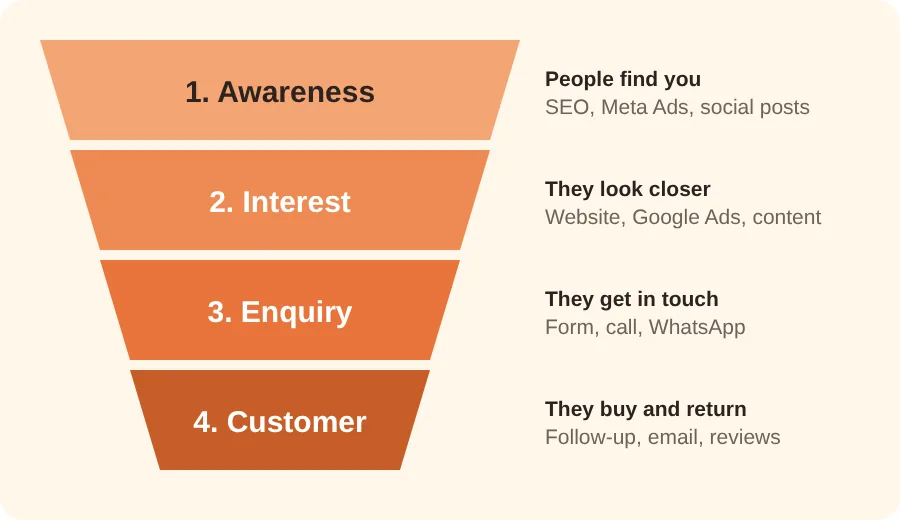
Each channel in this guide has a job in the funnel. SEO and social ads help people discover you. Your website and Google Ads help them decide. Forms, calls and WhatsApp capture the enquiry. Email and reviews bring them back. When you know the job of each channel, it becomes easier to decide where your money should go first.
Step 1: Set a goal and know your customer
Before you build or buy anything, write down one clear goal for the next three months. Good goals are specific and countable: "20 enquiries a month", "10 booked consultations" or "5 new orders a week". "More brand awareness" is hard to measure, so it makes a poor first goal.
Describe your ideal customer
Next, describe who you want to reach. Ask yourself:
- Who buys from me most often, and which area do they live in?
- What problem are they trying to solve when they find me?
- What do they type into Google when they need this?
Your answers shape everything else: the keywords you target, the ads you write and the tone of your website.
Step 2: Build a website that gets enquiries
Your website is the one place online that you fully control. Social media accounts can change their rules, but your website stays yours. It is also where every ad and every search result should send people, so it needs to do its job well.
What a small business website needs
- A clear headline that says what you do and who for, visible without scrolling.
- One page per main service, which helps both visitors and Google.
- Easy contact options: a short form, a phone number and a WhatsApp button.
- Proof you are real: your photo, address and genuine reviews.
- Speed, mobile design and HTTPS, because most visitors use a phone.
Every page should make one thing obvious: what you want the visitor to do next.
Step 3: SEO and local search
Search engine optimisation, or SEO, is the work of making your website easy for Google to understand and worth showing to people who search for what you offer. The traffic is free in the sense that you do not pay per click, but it takes time and steady effort. Most businesses need a few months before they see clear results, and the speed depends on competition.
Start with your Google Business Profile
If customers come to a place, or you serve a specific area, your Google Business Profile is the first thing to set up. It controls how you appear on Google Maps and in the local results box. Fill in everything: business name, category, address or service area, phone number, working hours, services and real photos. Keep your name, address and phone number exactly the same on your website and every directory. Then post updates and answer questions from time to time.
Find the words your customers use
Keyword research means finding the phrases people type when they need what you sell. Think like your customer, not like a professional in your industry. People search for "dentist near me", "wedding photographer in Pune" or "digital marketing for small business", not for your internal jargon. Free tools such as Google's own search suggestions and the "People also ask" box can give you plenty of ideas. Pick one main phrase for each page and a few related ones.
Do the basics on every page
- Put your main phrase in the page title, the main heading and the first paragraph, written naturally.
- Write a clear meta description that makes people want to click.
- Use short headings to break up the text.
- Add descriptive alt text to images, so they make sense to people using screen readers and to search engines.
- Link related pages to each other.
Create useful content and earn reviews
Articles that answer real customer questions earn trust and bring in search traffic, so write about the questions you hear most often. Reviews help you rank in local results and persuade new customers. Ask happy customers for a Google review and send them a direct link. Never buy fake reviews, because they break Google's rules.
Step 4: Google Ads
Google Ads lets you appear at the top of search results when someone searches for what you offer. These people are already looking, so they are often ready to call or buy. That makes search ads one of the quickest ways to get enquiries, as long as the campaign is set up with care.
How it works in simple terms
You choose the phrases you want to appear for, write short ads and set a daily budget. You pay when someone clicks. A good campaign sends each group of keywords to a matching page, so the visitor lands exactly where they expect.
Tips for small budgets
- Start narrow. Choose a few high-intent phrases such as "emergency AC repair Delhi" rather than a broad word like "AC".
- Use negative keywords to block searches such as "free" or "jobs" if they do not suit you.
- Target your area so ads show only where you can serve customers.
- Track every enquiry from forms, calls and WhatsApp clicks, and review results weekly.
Step 5: Facebook and Instagram ads
Ads on Facebook and Instagram, run through Meta, work differently from search ads. Nobody is searching, so you reach people while they scroll. You can choose who sees your ad by location, age and interests. This suits products that look good in photos and videos, new businesses, offers and events.
What makes these ads work
- Strong visuals. Use real photos or short videos of your work, shop or team. Plain, honest images often beat polished stock photos.
- One clear message and one action. For example, "Book a free consultation" with a single button.
- Retargeting. Show reminder ads to people who already visited your website or engaged with your page. They know you already, so they are far more likely to respond.
- Click-to-WhatsApp ads. In India, many customers prefer to chat before they buy. An ad that opens a WhatsApp conversation can fit this habit well.
Test two or three versions of an ad at a time with a small budget, keep the one that gets more enquiries and then try to beat it. Do not judge an ad by likes. Judge it by how many enquiries it brings and what each one costs.
Step 6: Email and WhatsApp
Getting a new customer costs money. Getting an existing customer to buy again costs far less, which is why email and messaging deserve a place in your plan even if you have a small list.
Email marketing
- Build the list honestly. Collect addresses on your website or after a sale, and always ask permission.
- Send useful messages: tips, offers and reminders that people want to read.
- Automate the basics: a welcome email, a follow-up after an enquiry and a thank-you after a purchase.
WhatsApp is where many Indian customers prefer to talk. Add a chat button to your website, set up a WhatsApp Business profile with your hours and catalogue, and reply quickly. Only send promotional messages to people who have agreed to receive them, and follow WhatsApp's business rules, or you risk getting blocked.
Step 7: Measure what matters
Digital marketing is easy to measure, but only if you set it up before you spend. Without tracking, you will not know which channel brought a customer, and you will end up guessing.
The numbers to watch
- Enquiries: the total number of calls, forms and WhatsApp chats.
- Cost per enquiry: what you spend on a channel divided by the enquiries it brings.
- Conversion rate: the share of visitors who send an enquiry.
- Customers won: how many enquiries actually became paying customers.
- Return on spend: the revenue you earn compared with what you spent.
Tools you need
Google Analytics shows how people use your website, and Google Search Console shows how your site appears in search. Conversion tracking in Google Ads and Meta shows which ads produce enquiries. Keep a simple sheet noting each enquiry and where it came from, even if you track it by hand at first.
How much should you spend?
There is no single right number, because it depends on your industry, your area and how much a customer is worth to you. A useful way to decide is to work backwards from the value of a customer.
Here is an example with made-up figures. Suppose an average customer is worth ₹10,000 to you in profit, and one in five enquiries becomes a customer. Then each enquiry is worth about ₹2,000. If you can bring in enquiries for much less than that, marketing pays for itself. If it costs more, you need to improve the offer, the website or the targeting before you scale up.
In practice, start with a modest test budget, run it for a few weeks, learn what works and then increase the spend on what brings the best return.
Common mistakes to avoid
- Doing everything at once. Pick one or two channels, do them well and add more later.
- Sending ad traffic to a weak page. Every ad needs a page with a clear next step.
- Not tracking enquiries. If you cannot count results, you cannot improve them.
- Slow replies. An enquiry that waits a day often goes to a competitor. Reply within hours.
- Expecting instant SEO results. SEO builds over months. Use ads if you need enquiries sooner.
A simple 90-day plan
- Days 1 to 30, build the base: set your goal, fix your website basics, set up your Google Business Profile and install tracking.
- Days 31 to 60, get traffic: publish helpful articles, ask for reviews and launch one small Google Ads or Meta campaign.
- Days 61 to 90, improve: stop what does not work, add email follow-ups and put more budget behind the channel with the lowest cost per enquiry.
Frequently asked questions
What is the best digital marketing channel for a small business?
It depends on your customers. If people search for what you sell, start with local SEO and Google Ads. If your product is visual, start with Facebook and Instagram. Most small businesses do best with a good website, one paid channel and email follow-up.
How long does SEO take to work?
SEO is a long-term channel. Many sites see early movement within a few months, but it depends on competition and how much work is done each month. Use paid ads if you need enquiries sooner.
Do I need a website if I already have social media pages?
Yes. A website is the only place you fully control, and customers use it to check that you are genuine. Social pages work well beside a website, not instead of one.
How much should a small business spend on ads?
Start with a small test budget, run it for a few weeks and learn your cost per enquiry. Then compare it with what a customer is worth to you and scale up what works.
Can I do digital marketing myself, or should I hire someone?
You can start with the basics in this guide. As your ad spend grows, a specialist can save you time and wasted spend by managing campaigns, tracking and reports.
Next steps
Digital marketing does not need a huge budget. It needs a clear goal, a website that makes it easy to get in touch, one or two well-run channels and honest tracking. Start with the basics, measure the results and improve a little every month.
If you want a second pair of eyes on your website and your ads, ask for a free check-up. I will review what you have and suggest quick improvements you can use straight away. You may also want to read my guide on the architecture design process, which helps if you are planning a new shop, clinic or office.
Want help with this for your business?
Get my free check-up